Permissions and Ownership
This page explains the difference between DataJoint SQL permissions and Linux filesystem permissions.
Two permission layers
Database permissions (MySQL/DataJoint)
controls table read/write/create/update operations
Filesystem permissions (Linux paths)
controls write access to on-disk data and blob storage
A user can pass SQL checks and still fail on filesystem writes.
Typical conflict case
Error during manual populate:
Permission denied: /datajoint-db/blobs/.../*.saving
Interpretation:
your DB user may be allowed to insert table rows
your Linux account cannot write temporary/final blob files in that path
Why worker accounts succeed
Worker processes run under service accounts configured with required filesystem group/ownership access for blob and output directories.
Permission model visuals (sanitized)
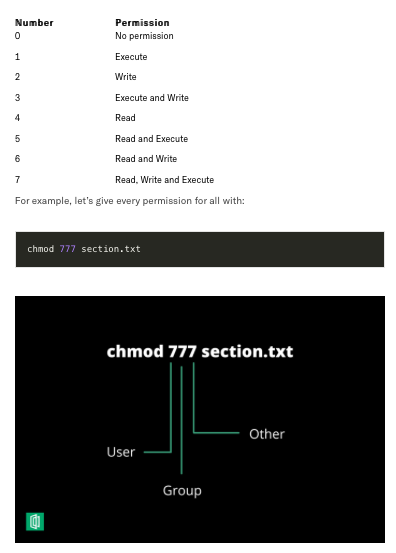
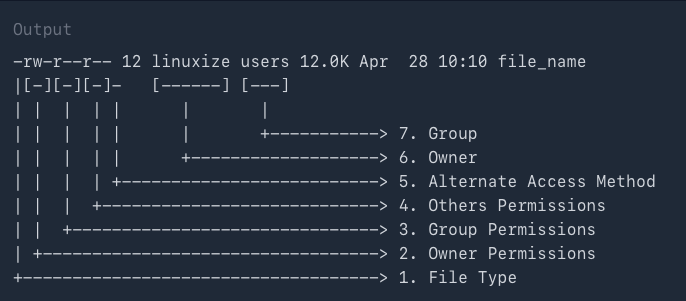
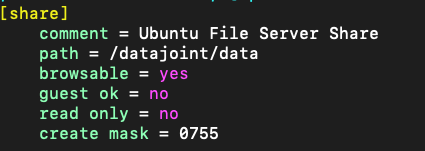
These reference visuals are included because they help quickly explain recurring support tickets around Unix modes and share behavior.
Unix permission bits reminder
Share configuration reminder
Operational note:
share-level access and filesystem-level ownership/mode bits both matter.
changing one without the other can still leave users blocked.
Practical policy for students
Use ingest GUI for metadata + task staging.
Let workers handle blob-heavy and long-running compute tables.
Run manual populate only for approved lightweight tables.
Inspecting directory ownership (admin/operator)
ls -ld /datajoint-db/blobs/
ls -l /datajoint-db/blobs/<prefix>
Look for:
owner user
group (for example datajoint admin group)
write bits for owner/group
Database grant example (admin-only)
GRANT SELECT, INSERT, CREATE, UPDATE ON `lab_%`.* TO 'username'@'%';
This does not configure Linux filesystem write access.
Secure operations notes
avoid broad write grants for all users to shared blob roots
prefer worker-mediated writes for sensitive outputs
keep webhook secrets and credentials out of repository code
avoid posting account credentials or personal identifiers in shared docs
Permission debugging checklist
Confirm table-level SQL grants for the DB user.
Confirm filesystem write access for the Linux user/group.
Reproduce on one key only.
Verify whether the same key succeeds via worker account.
Decide whether to adjust policy (preferred) or permissions (carefully).